Subprojects
1. Overview
Projects often depend on code from other repositories — shared libraries, frameworks, or configuration templates. Copying the code manually means maintaining every copy independently. Git offers two built-in solutions to include external repositories: submodules and subtrees.
In this chapter you will learn:
- How submodules embed a reference to an external repository at a pinned commit
- How subtrees merge external repository content directly into your project
- When to use submodules versus subtrees based on your workflow
2. Submodules
A submodule is a reference to a specific commit in another repository. Git stores only the URL and the commit hash — it does not copy the files into the parent repository until you explicitly initialize and update the submodule.
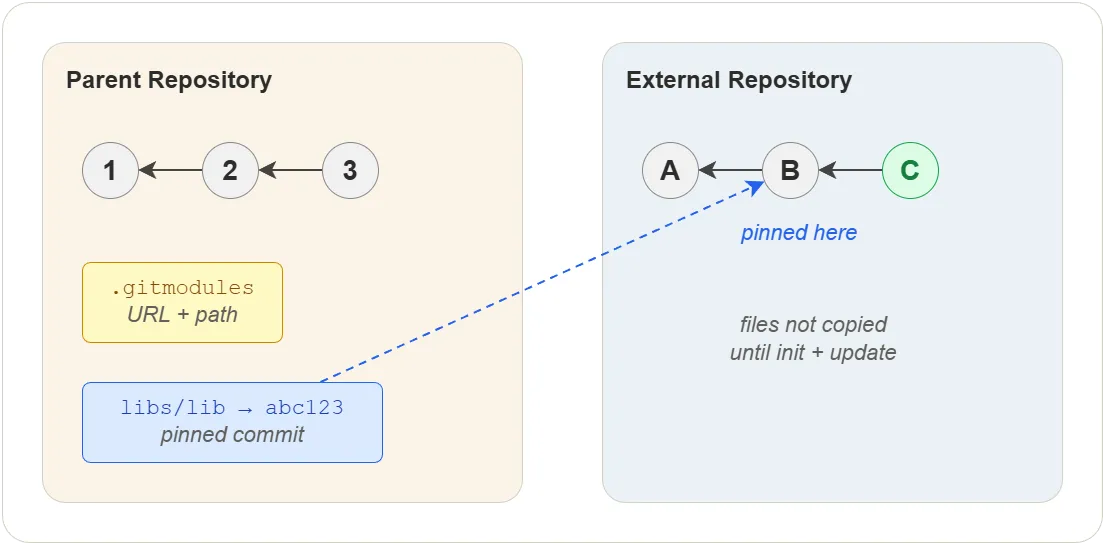
Adding a submodule
$ git submodule add https://github.com/user/lib.git <submodule>
$ git commit -m "Add lib as submodule"
This creates two entries:
.gitmodules— records the URL and path- A special directory entry in the index pointing to the pinned commit
After adding, the project looks like this:
project/
├── .gitmodules                ← URL and path for each submodule
├── .git/modules/<submodule>/ ← submodule's Git database
├── <submodule>/              ← submodule files
│   └── ...
└── src/
Cloning a repository with submodules
$ git clone --recurse-submodules https://github.com/user/project.git
If you already cloned without --recurse-submodules:
$ git submodule update --init --recursive
Updating a submodule
$ cd <submodule>
$ git fetch origin
$ git switch main
$ git pull
$ cd ../..
$ git add <submodule>
$ git commit -m "Update lib submodule"
Or update all submodules at once:
$ git submodule update --remote
Removing a submodule
$ git submodule deinit <submodule>       # unregister the submodule
$ git rm <submodule>                     # remove from index and working tree
$ rm -rf .git/modules/<submodule>        # clean up cached module data
$ git commit -m "Remove lib submodule"
Trade-offs
| Advantage | Drawback |
|---|---|
| Native to Git — no extra tools | Requires extra commands (submodule init, update) |
| Small footprint — commit reference only | Contributors must remember to initialize after cloning |
| Each submodule has independent history | Nested submodules skipped by default (need --recursive) |
| Pin to a specific version | Merging changes back into the submodule is awkward |
3. Subtrees
A subtree is a full copy of another repository — files and history — merged directly into a subdirectory of the parent project. Unlike submodules, the files are part of the parent repository and can be managed with standard Git commands.
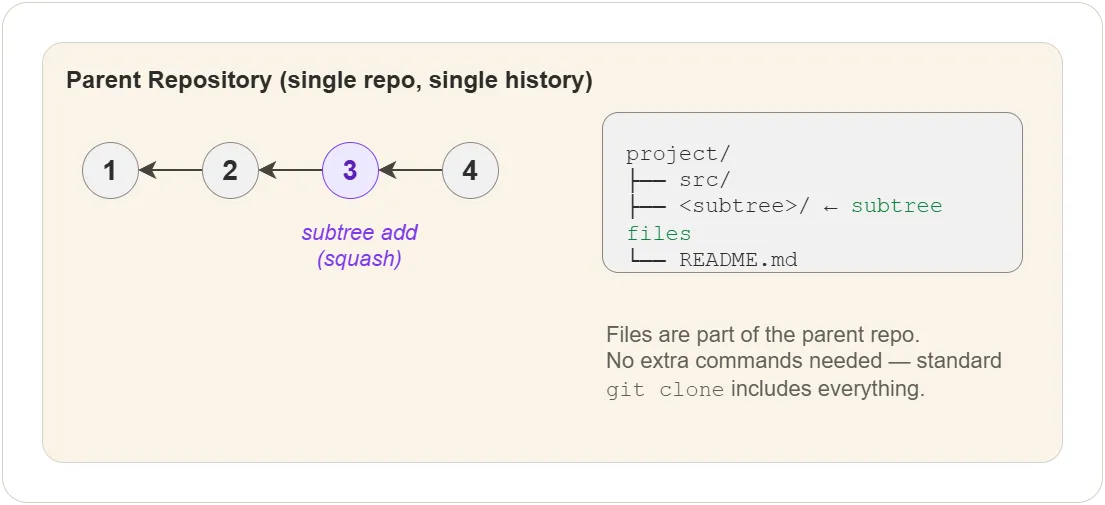
Adding a subtree
$ git subtree add --prefix=<subtree> https://github.com/user/lib.git main --squash
The --squash flag collapses the subtree’s history into a single
commit, keeping the parent history clean.
Pulling updates
$ git subtree pull --prefix=<subtree> https://github.com/user/lib.git main --squash
Pushing changes back
If you modify subtree files in the parent and want to push them back to the original repository:
$ git subtree push --prefix=<subtree> https://github.com/user/lib.git main
Removing a subtree
A subtree is just a directory — remove it like any other files:
$ git rm -r <subtree>
$ git commit -m "Remove lib subtree"
Unlike submodules, there is no metadata to clean up.
Trade-offs
| Advantage | Drawback |
|---|---|
| No extra commands — files are in the repo | Increases repository size (full copy) |
Works with standard clone, pull, push | Must not mix parent and subtree changes in commits |
No .gitmodules or metadata files | Requires understanding of merge strategies |
4. Which to use?
| Aspect | Submodules | Subtrees |
|---|---|---|
| Storage | Commit reference only | Full file copy |
| Contributor setup | Must run submodule init | Nothing extra |
| Update method | Manual (submodule update) | Standard (subtree pull) |
| Pin to version | Yes — by commit hash | No — always latest at pull time |
| Repo size impact | Minimal | Larger |
| Best for | Libraries pinned to a version | Frequently modified dependencies |
Use submodules for component-based development where you depend on a specific version of an external repository and rarely modify the dependency. Use subtrees for system-based development where you want a full copy of the code and expect to modify it alongside your project.
5. Other tools
- google repo — manages many Git repositories as a single project (used by Android)
- git subrepo — alternative to subtrees with cleaner UX
Exercises
All exercises use the concepts-lab repository from previous chapters.
Exercise 1: Add and use a submodule
Task: Add an external repository as a submodule, update it, and verify the pinned commit.
Steps:
- In
concepts-lab, add a public repository as a submodule:git submodule add https://github.com/braboj/tutorial-testing.git libs/testing - Run
git status— note the new.gitmodulesfile and thelibs/testingentry - Commit with the message
Add testing as submodule - Run
cat .gitmodulesto see the URL and path - Run
git submodule statusto see the pinned commit hash - Enter
libs/testingand rungit log --oneline -3to see its history - Back in the parent, run
git diff --cached --submoduleto confirm the reference
Verify:
.gitmodules lists the submodule. git submodule status shows the
pinned commit hash. The submodule directory contains the external
repository’s files.
Exercise 2: Clone a repository with submodules
Task: Simulate a fresh clone and verify submodules need explicit initialization.
Prerequisite: concepts-lab must be pushed to GitHub (see
Remote Repositories, Exercise 1).
Steps:
- Clone
concepts-labinto a new directory without--recurse-submodules:git clone <url> concepts-lab-fresh - Enter
concepts-lab-fresh/libs/testing— it should be empty - Run
git submodule update --init - Check
libs/testingagain — files should now be present - Run
git submodule statusto confirm the correct commit is checked out
Verify:
Before submodule update --init, the directory is empty. After, it
contains the submodule’s files at the pinned commit.
Exercise 3: Add a subtree
Task: Add an external repository as a subtree and verify the files are part of the parent repository.
Steps:
- In
concepts-lab, add a subtree:git subtree add --prefix=libs/docs https://github.com/braboj/tutorial-testing.git main --squash - Run
git log --oneline -3— note the squash merge commit - List
libs/docs/to confirm the files are present - Run
git status— the working tree should be clean (files are committed) - Edit a file in
libs/docs/, commit the change - Run
git log --oneline -5to see both the subtree add and your edit
Verify:
The subtree files are committed directly in the parent repository.
git log shows the squash merge and your edit as normal commits.
No .gitmodules file was created.
Quiz
Q1. What does a submodule store in the parent repository?
- A) A full copy of all files and history
- B) A URL and a pinned commit hash
- C) A compressed archive of the source code
- D) A symbolic link to another directory
Q2. What happens when you clone a repository with submodules
without using --recurse-submodules?
- A) Git refuses to clone
- B) The submodule directories exist but are empty
- C) Git automatically downloads all submodules
- D) The submodule entries are deleted
Q3. What is the main advantage of subtrees over submodules?
- A) Subtrees use less disk space
- B) Subtrees pin to a specific commit
- C) Contributors need no extra commands — files are already in the repo
- D) Subtrees support nested dependencies
Q4. When should you prefer submodules over subtrees?
- A) When you frequently modify the dependency
- B) When you want the dependency files in your repository
- C) When you need to pin to a specific version and rarely change the dependency
- D) When you want to avoid
.gitmodules
Answers
- B — A URL and a pinned commit hash
- B — The submodule directories exist but are empty
- C — Contributors need no extra commands — files are already in the repo
- C — When you need to pin to a specific version and rarely change the dependency